
SafetyNow Help Desk
We’ve built out this Help desk with short instructional articles and videos to help you get the most out of SafetyNow ILT. Simply click on the icon to expand the accordion and get your answer to common issues/concerns.
If you need additional support, please contact your Client Services Manager directly at 1.800.667.9300, or make use of the help form to send in a ticket.
ILT Demos
Download Talks
One Content Location
Ask Questions
There is an additional cost of $3 per learner or employee per month. Your membership includes 1 seat access to the Bridge Learning Management System and specialized safety training associated with your membership.
To access the LMS, click on the “eLearning login” link and use your email and password. If you are new to the system, click on the “Register for onboarding” link to set up your account.
Yes, you can customize the training courses by adding your own SCORM courses, PowerPoints, videos, or documents. The LMS is designed to be flexible and adaptable to meet your specific training needs.
If you encounter any issues with the LMS, you can contact our help desk for support. Our team is available to assist you with any technical difficulties or questions you may have.
The LMS includes a comprehensive analytics dashboard that allows you to track course completions, completion rates, overdue learners, and engagement. This data helps you make informed decisions and measure the impact of your safety training programs.
As a SafetyNow ILT member, you have access to hundreds of tools, links, and everything you need to update your safety training program, and now you have robust LMS and training resources too.
Just click on the “eLearning login link” and use your email and new LMS password to access the new Bridge Learning Management System.
If you don’t see a link on your homepage, contact our Customer Service team at 1-800-667-9300 or email support@safetynow.com.
Yes!!
We know that being able to access material via our mobile devices is important to many safety professionals so we’ve created an app for you!
Simply download the app for your device and log in!
In the Apple Store, search for the SafetyNow App
Please note that you still require an internet connection to access the material.
Yes!!
We know that being able to access material via our mobile devices is important to many safety professionals so we’ve created an app for you!
Simply download the app for your device and log in!
Android
Apple (coming soon!)
Please note that you still require an internet connection to access the material.
Constantly.
Our team closely follows Federal, State and Provincial regulation proposals and changes in Canada and the US, in addition to Industry specific bodies and case law. When a regulatory body prepares to implement a new standard addressed in our training, or a significant case settlement impacts our training, we strive to make the change well ahead of the implementation date, to help all of our customers stay in compliance.
What’s more, we audit and update our evergreen library every 3 years at a minimum.
For example, last year we updated over 50 courses.
You can save a post using the Favorites feature.
Every post on SafetyNow ILT has the option to “Favorite” – simply click on the button located at the top of the content

To access your Favorites collection, go to My Safety located on the side menu. Here you will find all your favorited items as well as your most recently viewed articles, downloads and policies.

The best way to renew your membership is to contact your Customer Service Manager.
If you don’t have their contact information, call our toll-free number and we can help you out!
1-800-667-9300
All of our content is written by experts. Some of it is from contributors from industry leaders and more. The majority of our content is written by our editorial team of experts so that you have the information you need.
All past newsletters are available on the member site. As a member you can read a digital copy of the newsletter at any time by following these steps:
1) Login, head to the Tools & Resources section and click on Newsletters

2) Here you will find all our published newsletters by month of issue. Find the Newsletter you would like to view.
3) Click the Download button to view and/or print it.
As a SafetyNow ILT member, you have access to thousands of members in North America – all of whom have dealt with similar issues and problems that you face on a daily basis. Part of the real value of SafetyNow is not only giving you REAL SOLUTIONS and best practices from our circle of experts and editors, but also putting you within arms length of a community of similar minded people.
Ask the Expert is a question answer channel. Use the form to post a question and get answers from not only us and our experts, but also members of the SafetyNow community. Find out what other members are doing. Give your opinion and advice to another member’s issue. Get started now, Ask an Expert!
To use this feature, first click on “Ask The Expert”.
Enter your question, the more details the better. Including topic, jurisdiction, industry, and anything else that help the experts better understand your situation.

You will see all the previously asked questions, you can view them chronologically or search for keywords to see if your questions has already been answered.
You will be notified via e-mail when your question has been answered or receives any comments.
SafetyNow ILT includes meeting kits that you can modify to use in your own organization. Finding these is simple, but modifying them to suit your own purposes can be slightly more complex. We’ll go over some tips to make this easier on you.
First find the meeting kit you want to modify. Each will have a PDF version. The PDFs can be edited in Microsoft Word or, if you have a license, Adobe’s official PDF software.
Once you’ve found the meeting kit you want to modify, go ahead and download the PDF using the link at the bottom. Once it’s downloaded, you can open it in Word and start modifying it.
It is up to you how you want to modify your meeting kit. Carefully read the content and make sure it lines up with your company needs. You can always add, modify or delete anything in these documents but be aware of the current regulations on the topic.
Once you are done modifying the document, delete the first page and save the document. You can then print, save, send and distribute the meeting kit in any matter you see fit.
Yes! We know that you can’t always be attached to your computer.
As a SafetyNow ILT member, you can download the content and tools to use as you need. Most items have a download option to make it easy for you to get the material you need.
Some tools will offer both a PDF, PPT or Word Doc option so you can either use the material as is or edit it to suit your needs.
SafetyNow ILT content is for members only! If you are a member, make sure you are logged in. If you aren’t a member – sign up today!
If you continue to have trouble viewing an article while you are logged in, contact us at customerservice@safetynow.com or call 1-800-667-9300.
We’ve organized our content library in a few ways, and one of the major ones is by resource type.
You can find this by click on the Tools and Resources tab of the navigation.

Searching on SafetyNow ILT is quite simple. Type in your keywords in the search bar located at the top of the screen.

Your results will appear on the search page. To filter your search results even further, use the checkboxes on the left of the screen to choose a jurisdiction, topic or tool.
You can also find related content on every page you visit – these help you find similar content if you are looking for more than one thing.
If your search does not provide the results you are looking for, try another search term. If you are still having issues finding the resources you need, please contact our support team or submit a ticket.
No problem!
SafetyNow ILT makes it easy to reset your password.
Simply go to the login page and click on “Forgot Password”. You will be prompted to enter your username or email. A reset password email will be sent to the email address we have on file.
If you forgot your username or email used to create your account you can use the Chat feature on the site to get help right away. If you prefer to speak to someone, call 1-800-667-9300 or email customerservice@safetynow.com and our customer service team will be happy to help you out.
We know sometimes seeing is believing… you won’t believe how much time you’ll save having a membership to SafetyNow ILT. So to help you, we offer a free trial.
It’s easy to sign up for your free trial – just click here, enter your information and you’re all set!
If you need more help – just reach out to our Customer Support team at 1-800-667-9300 for assistance!
SafetyNow ILT is always adding Upcoming Webinars and as a member you can attend as many as you like!
You can find all the upcoming webinars right from the home page

To register for a webinar, simply click the register button to go to the registration page, click the link to register and fill out the form.
No problem! SafetyNow ILT makes it easy to reset your password.
Simply go to the login page and click on “Forgot Password”. You will be prompted to enter your username or email. A reset password email will be sent to the email address we have on file.

If you are experiencing issues resetting your password, contact your Customer Service Representative or call our Customer Service Center at 1-800-667-9300.
Searching on SafetyNow ILT is quite simple. First, click the Magnifying Glass located in the upper right of the site

Type in your search term and your results will appear on the search page. To filter your search results even further, use the checkboxes on the left of the screen to choose an industry, type, topic or language.
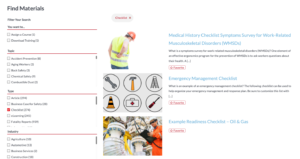
You can also find related content on every page you visit – these help you find similar content if you are looking for more than one thing.
We’ve organized our content library in a few ways, and one of the major ones is by resource type.
You can filter these down by clicking on the filters on the left side of the All Topics screen, as pictured below:
Clicking on the checkmark next to a Topic, Type, or Industry will let you filter down to just the resources that match what you checked.
You can also get even more refined results by selecting Assign a Course (to only see online training) or Download Training.
Here is a list of all the resource types and what they are.
- Safety Talks: Compilations of material used for instructor led training (ILT). They include a PowerPoint, a handout, a quiz, and a leader guide.
- Safety Videos: Videos that we have sourced for you to use as part of your Safety Training.
- Picture This: Pictures of people doing things very unsafely, and tips on how you can avoid the same issues.
- Training Plans: Monthly training plans to help you find appropriate safety materials and plan out your training program.
- Stats & Facts: Statistics and various fact sheets regarding safety training, safety management, and the impact it has on organizations.
- Train the Trainer: These special materials will help you become a better trainer. You can learn how to better deliver a safety meeting, manage your program more efficiently, and more.
- CEO Briefing: These briefings will help you make the business case for safety.
- Fatality Reports: These reports of real life incidents and fatalities will help you reinforce the importance of safety.
- Puzzles and Games: Crossword puzzles, Word searches, and more to help engage your crew during safety meetings and otherwise.
- Safety Checklists: These lists will help you build out a comprehensive safety program on almost any topic.
- Special Reports: These reports include our quarterly newsletter, Environmental Compliance Insider. You can also find various reports we’ve put together over the years covering numerous subjects.
Safety Talks are compilations of material used for instructor led training (ILT). They include a PowerPoint, a handout, a quiz, and a leader guide. They are useful for delivering short, meaningful training on a regular basis. This is compared to e-Learning, which is more useful for autonomous training, yearly compliance training, etc.
Finding Safety Talks is easy. You can find them from the home page on the main image or under the resources menu.


Once you find the Safety Talk you want to see, click on it to open it up and download or present how you like.
SafetyNow ILT content is for members only! If you are a member, make sure you are logged in. If you aren’t a member – sign up today!
We also have a separate tier that includes videos, so if you’re logged in but still unable to access videos, let us know and we can discuss adding videos to your subscription.
If you continue to have trouble viewing an article while you are logged in, contact us at customerservice@bongarde.com or call 1-800-667-9300.
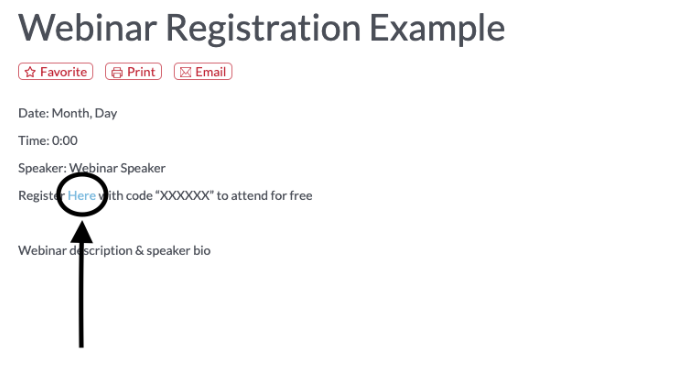
To register for a webinar, simply click the register button to go to the registration page, click the link to register and fill out the form.
To view all our upcoming webinars, click on the “Upcoming Webinars” box from the member dashboard. Here you will be able to see and register for all our upcoming webinars.
Our members can view for free using the promo code provided in the Webinar information posts.
Yes! We know that you can’t always be attached to your computer.
As an SafetyNow ILT member, you can download the content and tools to use as you need. Most items have a download option to make it easy for you to get the material you need.
Some tools will offer both a PDF or Word Doc option so you can either use the material as is or edit it to suit your needs. You can also download and modify PowerPoints in any way you need.
There are a few types of training when it comes to safety. By far, the most common type of training is Instructor-Led, although you may not know it by that name.
Any time someone is standing in front of a group of people and training them, that is Instructor-Led Training, or ILT. This could be a toolbox talk, a class, or a safety talk. Regardless, the key is that an instructor is presenting material to a group of people.
ILT is useful for delivering short, meaningful training on a regular basis. This is compared to e-Learning, which is more useful for autonomous training, yearly compliance training, etc.
At SafetyNow ILT, our philosophy is to create articles, Meeting Kits, videos, puzzles and games, and more, to help you deliver memorable training without spending hours creating it.